
Last updated on
Nov 6, 2026
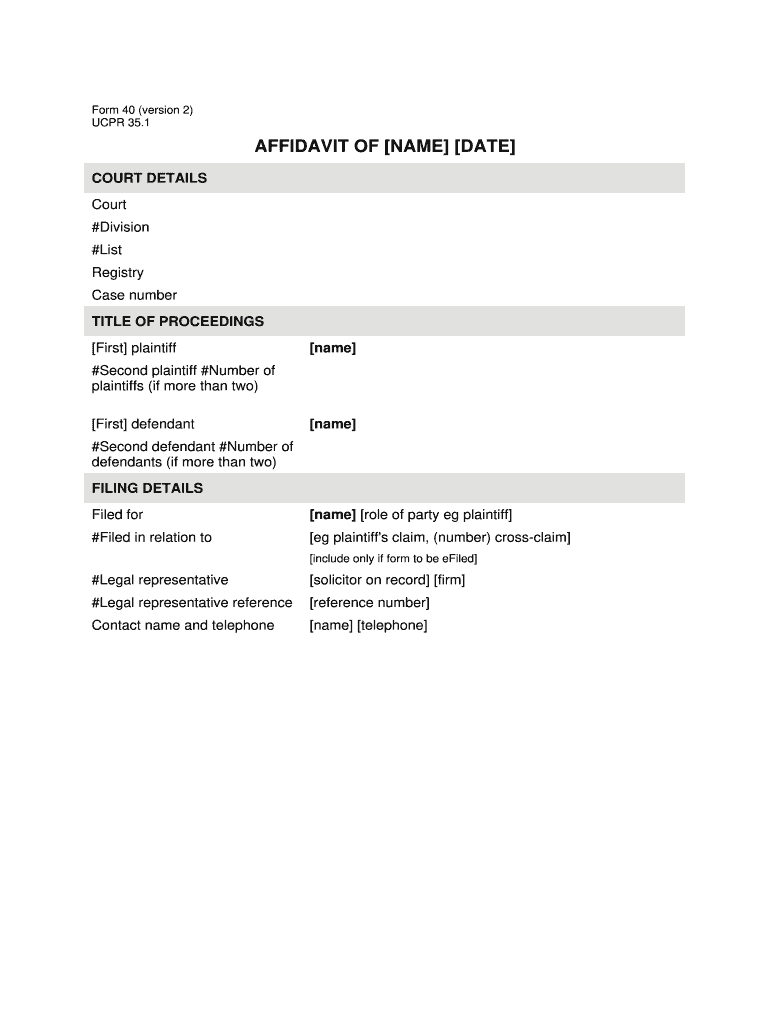
Form 40 UCPR 351 free printable template
pdfFiller is not affiliated with any government organization

Fill out
Complete the form online in a simple drag-and-drop editor.

eSign
Add your legally binding signature or send the form for signing.

Share
Share the form via a link, letting anyone fill it out from any device.

Export
Download, print, email, or move the form to your cloud storage.
Why pdfFiller is the best tool for your documents and forms


End-to-end document management
From editing and signing to collaboration and tracking, pdfFiller has everything you need to get your documents done quickly and efficiently.
Accessible from anywhere
pdfFiller is fully cloud-based. This means you can edit, sign, and share documents from anywhere using your computer, smartphone, or tablet.
Secure and compliant
pdfFiller lets you securely manage documents following global laws like ESIGN, CCPA, and GDPR. It's also HIPAA and SOC 2 compliant.
What is Form 40 UCPR 351
The Affidavit Form 40 is a legal document used by individuals in Australian courts to provide sworn statements as evidence.
pdfFiller scores top ratings on review platforms




Its what I needed to complete paperwork.
Great product
Great product, i love it. Seriously join what are you waiting for lol seriously though, its an awesome product. Thank you.
Who needs Form 40 UCPR 351?
Explore how professionals across industries use pdfFiller.

Form 40 UCPR 351 is needed by:
-
Individuals involved in legal proceedings
-
Attorneys and legal representatives
-
Witnesses requiring to certify statements
-
Anyone needing to submit sworn statements in court
-
Persons seeking to document legal testimony
Comprehensive Guide to Form 40 UCPR 351
What is the Affidavit Form 40?
The Affidavit Form 40 plays a crucial role in Australian legal proceedings by allowing individuals to provide sworn statements. An affidavit is a written declaration made under oath, essential for presenting evidence to the court. This form is integral to Australian court affidavits, as it ensures that statements are legally binding and verifiable.
Within the context of legal affairs, the Affidavit Form 40 serves as the necessary documentation for presenting facts in civil cases, family law, and other legal matters where personal testimony is required.
Purpose and Benefits of Using Affidavit Form 40
Sworn statements, such as those made with the Affidavit Form 40, are vital for establishing credibility in legal contexts. For the deponent— the individual making the affidavit— the form protects their rights by providing a formal record of their statements. The witness, who verifies the deponent’s identity, also benefits by contributing to the integrity of the legal process.
Benefits of utilizing the affidavit include:
-
Enhanced legal standing of the provided information.
-
Framework for dispute resolution in court settings.
Key Features of the Affidavit Form 40
Affidavit Form 40 includes specific fillable fields that ensure all necessary information is collected. These fields typically include the following:
-
Name
-
Address
-
Occupation
-
Date
-
Signature lines for both the deponent and witness
The form also contains essential instructions for both parties, clarifying their responsibilities during the affidavit process, thereby enhancing compliance with legal standards.
Who Should Use the Affidavit Form 40?
The Affidavit Form 40 is intended for individuals involved in various legal situations that necessitate formal statements. This includes cases in family law, civil disputes, and other scenarios where factual testimony is required. The deponent prepares the affidavit, while the witness is responsible for affirming the deponent’s identity and the correctness of the affidavit content.
How to Fill Out the Affidavit Form 40 Online (Step-by-Step)
Filling out the Affidavit Form 40 online can be straightforward if you follow these steps:
-
Open the Affidavit Form 40 on the pdfFiller platform.
-
Enter your name, address, and occupation in the respective fields.
-
Provide the relevant information that constitutes your sworn statement.
-
Check all filled fields for accuracy.
-
Complete the signatory sections for both yourself and your witness.
Completing these critical fields accurately ensures that your legal affidavit template is both valid and compliant with Australian court standards.
How to Sign and Notarize the Affidavit Form 40
The signature of both the deponent and the witness is essential for the validity of the Affidavit Form 40. Notarization serves as an additional layer of verification. For notarizing the document, you can choose between digital or wet signatures, depending on court requirements.
This process generally requires the presence of the notary public, who will confirm the identities of those signing and ensure adherence to legal protocols.
Submission Methods for Affidavit Form 40
After completing the Affidavit Form 40, it is crucial to submit it properly. There are various methods available for submission, including:
-
Online submission through court portals.
-
Mailing a physical copy to the appropriate court.
After submission, it is advisable to secure confirmations to establish proof of filing.
Common Errors to Avoid When Filling Out Affidavit Form 40
Users often make several common mistakes when completing the Affidavit Form 40. To avoid errors:
-
Ensure all fields are filled out completely and accurately.
-
Double-check the correctness of the information provided.
-
Verify that signatures are both present and correctly positioned.
Taking these steps helps guarantee that your legal affidavit template meets all necessary criteria and avoids delays in legal proceedings.
Security and Compliance When Handling Affidavit Form 40
When handling sensitive legal documents, such as the Affidavit Form 40, ensuring document security and compliance with regulations is paramount. pdfFiller emphasizes data protection with features such as 256-bit encryption and adherence to regulations like HIPAA and GDPR.
This focus on security helps protect both the deponent and witness information while ensuring compliance with legal standards.
Effortless Form Completion with pdfFiller
Utilizing pdfFiller enables users to complete and manage the Affidavit Form 40 efficiently. The platform's features allow for straightforward editing, eSigning, sharing, and secure storage of the affidavit and associated documents.
This ease of use makes pdfFiller an invaluable tool for anyone needing a reliable legal affidavit template.
How to fill out the Form 40 UCPR 351
-
1.Access the Affidavit Form 40 on pdfFiller by typing its name in the search bar or selecting it from the legal forms category.
-
2.Once you open the form, familiarize yourself with the fillable fields. Look for sections labeled for the Deponent's name, address, and occupation.
-
3.Prior to filling out the form, ensure you have all required information at hand, including personal details, the affidavit's content, and witness information.
-
4.Begin with entering your name in the designated box, followed by your address, and then your occupation in the appropriate fields provided.
-
5.Carefully read the instructions included within the form for both the deponent and witness to ensure compliance with signing requirements.
-
6.After completing all fields, review the form thoroughly to ensure all information is accurate and complete before finalizing.
-
7.To save your progress, use the save option, and for downloading, select the download button to get a copy of the completed form.
-
8.Once finalized, submit your affidavit as directed by your legal requirements or store it safely for future reference.

Who is eligible to use the Affidavit Form 40?
Any individual seeking to provide a sworn statement in Australian court proceedings is eligible to use the Affidavit Form 40, as long as it is signed by both the deponent and a witness.
What documents do I need to fill out the Affidavit Form 40?
Before completing the Affidavit Form 40, gather your personal information including your name, address, occupation, and the content you wish to include in the affidavit, along with a witness's details.
How do I submit the Affidavit Form 40?
The Affidavit Form 40 can be submitted in person at the court or other designated legal entities as required. Alternatively, consult your attorney for specific submission procedures.
What are common mistakes to avoid with the Affidavit Form 40?
Common mistakes include failing to fill in all required fields, not having the witness sign the document, or leaving out necessary information, which can delay legal proceedings.
Is notarization required for the Affidavit Form 40?
Yes, notarization is required for the Affidavit Form 40, ensuring the document is legally binding and that the deponent's identity is verified.
What is the processing time for the Affidavit Form 40?
Processing times for the Affidavit Form 40 can vary depending on the court's workload. It is advisable to allow a few weeks for the document to be processed.
Can I edit the Affidavit Form 40 after submission?
Once submitted, you generally cannot edit the Affidavit Form 40. If changes are needed, consult your attorney for guidance on how to proceed with modifications.
Related Content
Related Forms





Related Catalogs
Get the latest insights from our blog


If you believe that this page should be taken down, please follow our DMCA take down process
here
.
This form may include fields for payment information. Data entered in these fields is not covered by PCI DSS compliance.